Unihfy Games

Word Weave

Word Weave

wordpuzzlelettersvocabularybrainsolocasual

Games > Word Weave

Play Word Weave • Free

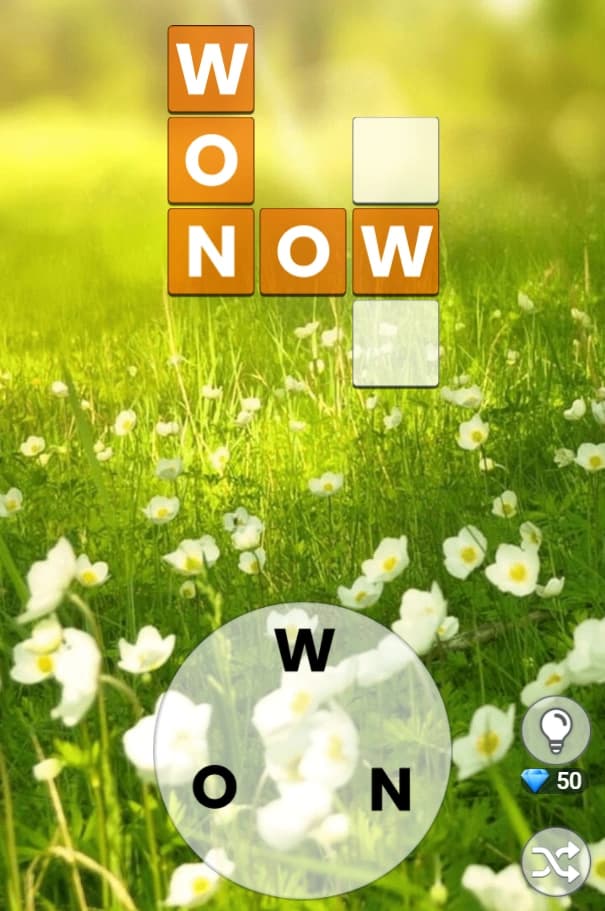
A ring of scrambled letters and a crossword grid waiting to be filled. Swipe across the ring to spell each word, and every solved answer locks into the shared grid until the whole thing is complete. 500 levels, three to seven letters at a time.

Genre: Word Puzzle

Difficulty: Medium

About Word Weave

It is a letter ring, not a keyboard

There is no typing here. Every level gives you a small ring of letters, and the whole game is swiping across them in the right order to spell a word that belongs somewhere in the grid above. Get it right and it locks in; get it wrong and nothing happens except that you try again.

The letters in the ring do not change between words within a level - the same handful gets reused for every answer, which is what makes the puzzle work. A four-letter word and a six-letter word from the same level are drawn from an overlapping pool, so solving one often makes the next one more obvious, because you have effectively ruled a few letters back into play.

The shuffle button exists because a ring can sit in an order that is genuinely awkward to trace with a finger, particularly on a phone. It does not change the puzzle - it only rearranges the letters in place - so there is no reason not to use it whenever the layout feels clumsy.

One grid, filled from several directions

The words you find are not solved in isolation. They all land in a single shared crossword grid, and because words cross each other, letters you place while solving one answer are often already sitting there when you reach the next.

That is the real difficulty curve of the game. Early words in a level are the hardest, because the grid is empty and you have nothing to lean on beyond the letters in the ring. By the last word or two, several of its letters are usually already filled in from the words around it, and the puzzle becomes closer to confirming a word than finding one from scratch.

It rewards working the grid loosely rather than word by word - glancing at which cells are already filled before committing to a swipe often shortens the search considerably.

Gems come from playing, not from playing fast

Solving a puzzle pays out gems, and gems are the only thing that buys a hint. There is no separate reward for speed and no bonus for a clean run without a wrong guess - a slow, careful solve earns exactly what a fast one does. The economy is built around solving, not performing.

That matters for how you should treat a hint. Since gems only come from finishing puzzles, spending one to get unstuck on a hard level is not a loss you need to be precious about, provided you are generally clearing levels faster than you are burning hints on them. Hoarding gems for no reason just means sitting stuck on a level you could get past.

There is no way to buy gems directly and no advertising built into the flow, as far as the game's own data shows - the only source is finishing levels.

Five hundred levels, organised into chapters

The level select is split into chapters rather than one long list, and levels within a chapter unlock in order as you clear what comes before them - there is no jumping ahead to preview a later one. Across the whole game there are 500 levels, running from short three-letter answers early on up to seven-letter words later.

Because the letter pool and the grid both grow with the word length, a seven-letter level is not simply a longer version of a three-letter one - there are more cross-references to track and more of the ring to hold in mind while you search. The jump in difficulty across the game is more about how much you are juggling at once than about any single word being obscure.

Progress is saved locally in your browser as you go, so closing the tab mid-level does not cost you the chapter you have reached.

Reviewed By
Kaushik Hirpara

Developer · Game Reviewer

Kaushik Hirpara is a full-stack developer and game reviewer at Unihfy Games. He does most of the work of bringing games to the site — adapting them to run properly in a browser, getting them working on phones, playing them, and writing up what players need to know.

View Profile
Game Created By

Unihfy Games

Word Weave is an original game created and published by Unihfy Games. We continue to improve it with new features, gameplay enhancements, and platform optimizations.

Game created by Unihfy Games.

Proprietary SoftwareAll game credits

How to Play

  • Pick a level from the chapter selection screen - locked ones open as you clear the ones before them.
  • A handful of letters sits arranged in a ring at the bottom of the screen.
  • Swipe across them in order to spell a word hidden in the grid above.
  • Correct words lock into the crossword grid, sharing letters with words already placed.
  • If the letters won't cooperate, tap shuffle to rearrange the ring without losing progress.
  • Solving a puzzle earns you gems, which pay for hints on ones that stump you.
  • Fill every word in the grid to clear the level and unlock the next.

Gameplay Preview

Features

A swipe-the-ring mechanic rather than typing - no on-screen or physical keyboard needed
500 levels split across chapters, unlocking in order as you clear them
Words from three to seven letters, with the ring's letter pool shared across a whole level
A single crossword grid per level, filled from multiple overlapping words
A shuffle button to rearrange the ring without affecting your progress
A gem currency earned by solving puzzles and spent on hints
No speed bonus or accuracy bonus - gems are paid out for finishing, not for how fast
Locked levels and chapters that open progressively rather than all at once
Progress saved automatically in the browser between visits
Touch swipe or mouse drag, working the same way on phone and desktop

FAQs

How do I actually spell a word - do I type it?

No keyboard is involved. A ring of letters sits on screen and you swipe across them in order to spell the word you're after. Get it right and it locks into the grid above.

What's the difference between the grid sizes?

Word Weave runs from short three-letter answers in its early levels up to seven-letter words later on. The letter ring and the grid both grow to match, so later levels ask you to track more overlapping words at once rather than just longer individual ones.

The letters in the ring are in an awkward order - what can I do?

Tap the shuffle button. It rearranges the ring into a new layout without touching anything you've already solved, so there's no downside to using it whenever a swipe path feels clumsy.
What happens if I get stuck on a puzzle?

You can spend gems on a hint, which reveals a letter or a word. Gems are earned by solving other puzzles, so getting unstuck on one hard level is rarely a real cost if you're clearing levels steadily elsewhere.

How do I earn gems, and is there a bonus for solving quickly?

Gems come from solving puzzles - that's the only source. There's no extra reward for speed or for solving without a wrong guess, so there's no reason to rush; a careful solve pays exactly the same as a fast one.

Can I type answers with a physical keyboard, or only by tapping?

Neither, technically - there's no typing at all. On both desktop and mobile you spell words by dragging or swiping across the letter ring, so a mouse drag and a finger swipe do the same job depending on your device.

How many levels are available in the game?

500, organised into chapters. Levels unlock in order within a chapter as you clear the ones before them, so there's always exactly one puzzle in front of you rather than a long list to pick from freely.
Will I lose my progress if I close the tab?

No. Your progress is saved locally in your browser as you clear levels, so returning later picks up from the same chapter and level you left.
Ready for a New Challenge?

Take on exciting quizzes, improve your general knowledge, earn XP, collect rewards, maintain your daily streak, and compete with players on the Quiz Arena leaderboard.

Go to Quiz Arena