Snake
Games > Snake
Play Snake • Free
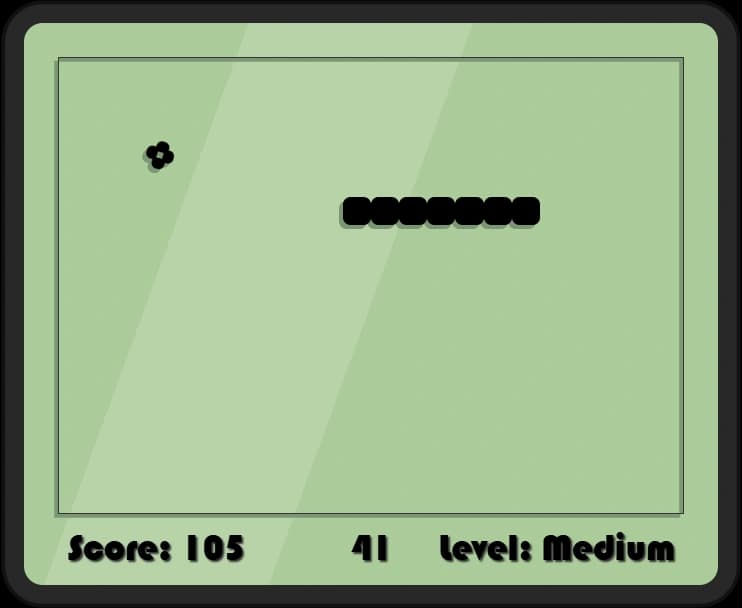
Guide your growing snake to eat food and avoid obstacles in this timeless arcade classic. Challenge yourself across four difficulty levels, from leisurely Easy mode to intense Super mode, and compete on the global leaderboard.
Genre: Puzzle/Action
Difficulty: Progressive (Easy to Extreme)
Developer · Quiz Editor
Omik Babariya is a full-stack developer and quiz editor at Unihfy Games. He writes most of the quiz questions, works on the sports and entertainment articles, and has built and tested a number of the games on the site.
Snake was originally created by Tomás Malbrán and is published here under its original licence terms. We host and maintain this version, while preserving the required attribution.
How to Play
- Start by selecting your difficulty level: Easy, Medium, Hard, or Super. New players should begin with Easy mode.
- Use arrow keys or WASD to guide your snake around the game board.
- Navigate your snake toward the food (flashing squares on the board).
- When the snake eats food, it grows longer by one segment, and your score increases.
- Avoid crashing into the walls at the edges of the game board - it's game over if you hit them.
- Be careful not to run into your own tail as your snake grows longer - collision with yourself ends the game.
- As you progress, the game speed increases, making it harder to react in time.
- Try to create a long snake by eating as much food as possible before you crash.
- When the game ends, you can save your high score by entering your name.
- Challenge yourself to climb the leaderboard and beat the top 5 scores for each difficulty level.
Gameplay Preview
Features
FAQs
Can I play this game on my mobile device?
Yes! Snake is a browser-based game that works on both desktop and mobile devices. Simply open it in any modern web browser. On mobile, you can use on-screen buttons or tilt controls if your device supports them, depending on your browser configuration.
How are high scores saved? Will I lose them if I close the browser?
Your high scores are saved locally in your browser's storage using browser cookies and local storage. As long as you don't clear your browser's cache and cookies, your scores will be preserved even after closing the browser or turning off your computer.
What's the difference between the four difficulty levels?
Each level increases the game speed: Easy moves at 300ms per action, Medium at 200ms, Hard at 100ms, and Super at an intense 50ms. Faster speeds mean you have less time to react and plan your snake's movement. Higher difficulties also award more points per food eaten, encouraging skilled players.
Can I pause the game in the middle of playing?
Yes. Space or P pauses at any point and brings up a menu with continue and new game. An interrupted run can also be picked up later through Continue on the main menu, which restores the exact state you left it in.
What happens if my snake hits a wall or itself?
The game ends immediately when your snake crashes into the border walls or collides with its own body. You'll be presented with the game over screen where you can save your score (if it's in the top 5 for that level), view the leaderboard, or start a new game.
How does the scoring system work? Does eating more food give more points?
Your score increases each time your snake eats food. The exact points awarded depend on your difficulty level - higher difficulties grant more points per food eaten. Additionally, there's a food timer mechanic where eating fresh food before it disappears from the board gives bonus points, rewarding quick reflexes.
Can I save my game progress if I need to leave in the middle?
Yes! Use the Pause feature and then select 'New Game' or close the window. Your game state (including snake position, food location, and score) is saved automatically. You can resume your game from the main menu by clicking 'Continue' next time you play.
Is there a time limit to complete each level?
No, Snake doesn't have a level-based progression system with time limits. Instead, it's an endless game where you play until your snake crashes. Your goal is to score as many points as possible before that inevitable collision. Each difficulty level continues indefinitely until you lose.
Can I play the demo mode to practice before playing seriously?
Yes! Select any difficulty level and the demo mode will automatically show you a preview of the game at that speed. This is a great way to understand the pace and watch AI strategies. The demo runs briefly on each level before you enter the main menu.
How many high scores are stored per difficulty level?
The game maintains a top 5 leaderboard for each of the four difficulty levels, storing a total of 20 high score slots. When you beat a score and enter your name, it automatically inserts your score in the correct position and pushes lower-ranked scores out if the list is full.
More like this

More like this




Ready for a Challenge?
Play quizzes, earn XP, collect rewards and climb the leaderboard.
Go to Quiz ArenaMore like this












Ready for a New Challenge?
Take on exciting quizzes, improve your general knowledge, earn XP, collect rewards, maintain your daily streak, and compete with players on the Quiz Arena leaderboard.
Go to Quiz Arena